Microsoft is preparing a new change to strengthen the security of Windows 11. Starting in October 2026, memory integrity will be automatically enabled on more supported PCs through Windows Update.
This feature helps better protect Windows from malware and dangerous drivers, but it can also have some unwanted effects. We explain it to you.
Memory integrity will soon be automatically enabled on some PCs
Starting October 2026, Microsoft will start automatically enabling memory integrity on eligible Windows 11 PCs. The change will be rolled out gradually through Windows Update quality updates.
However, not all computers will be affected. Before enabling this protection, Windows will check several things, including the PC’s hardware configuration, the compatibility of installed drivers, and the possible impact on performance. If necessary, virtualization-based security (VBS) can also be automatically enabled, essential for memory integrity to function.
However, Microsoft specifies that it will respect the settings already chosen by users. If you have voluntarily disabled memory integrity on your PC, Windows will not automatically reactivate it in October.
What does memory integrity do in Windows 11?
Imemory integrityalso called HVCI (Hypervisor-protected code integrity), is a security feature that has been present in Windows for several years. It relies on hardware virtualization of the processor to isolate certain security features and better protect the Windows kernel.
In other words, its role is to prevent malicious code or dangerous drivers from being executed at the kernel level. This way, you can block certain attacks that take advantage of vulnerable drivers to take control of your PC or gain elevated privileges.
This protection, however, has some drawbacks. Some older or incompatible drivers may no longer work after enabling memory integrity. In addition, it can also impact PC performance, especially when playing video games.
What impact exactly does it have on game performance?
The impact on game performance largely depends on the hardware used and the games you play. On a recent PC, the difference should still be quite small. On the other hand, it may be higher with an older processor. In particular, this can cause a drop in the number of frames per second (FPS) in certain games.
And this problem is not new. Microsoft had already recognized in 2022 that some Windows 11 security features, including memory integrity, could reduce performance in some games. The company had even explained in the past how to temporarily disable this protection to gain some performance in the game, recommending reactivating it once the game is over.
Therefore, Microsoft will take PC performance into account before automatically enabling memory integrity starting in October. If the impact is considered too significant, the protection will not be activated automatically.
To find out if Memory Integrity is enabled on your PC, open the app Windows Securitythen go to Device Security > Core Isolation Details.
Then you will find the option “ Memory integrity », accompanied by a switch that allows you to immediately see if the protection is activated or deactivated. You can also get to this page more quickly by searching for “Kernel Isolation” in the Start menu.
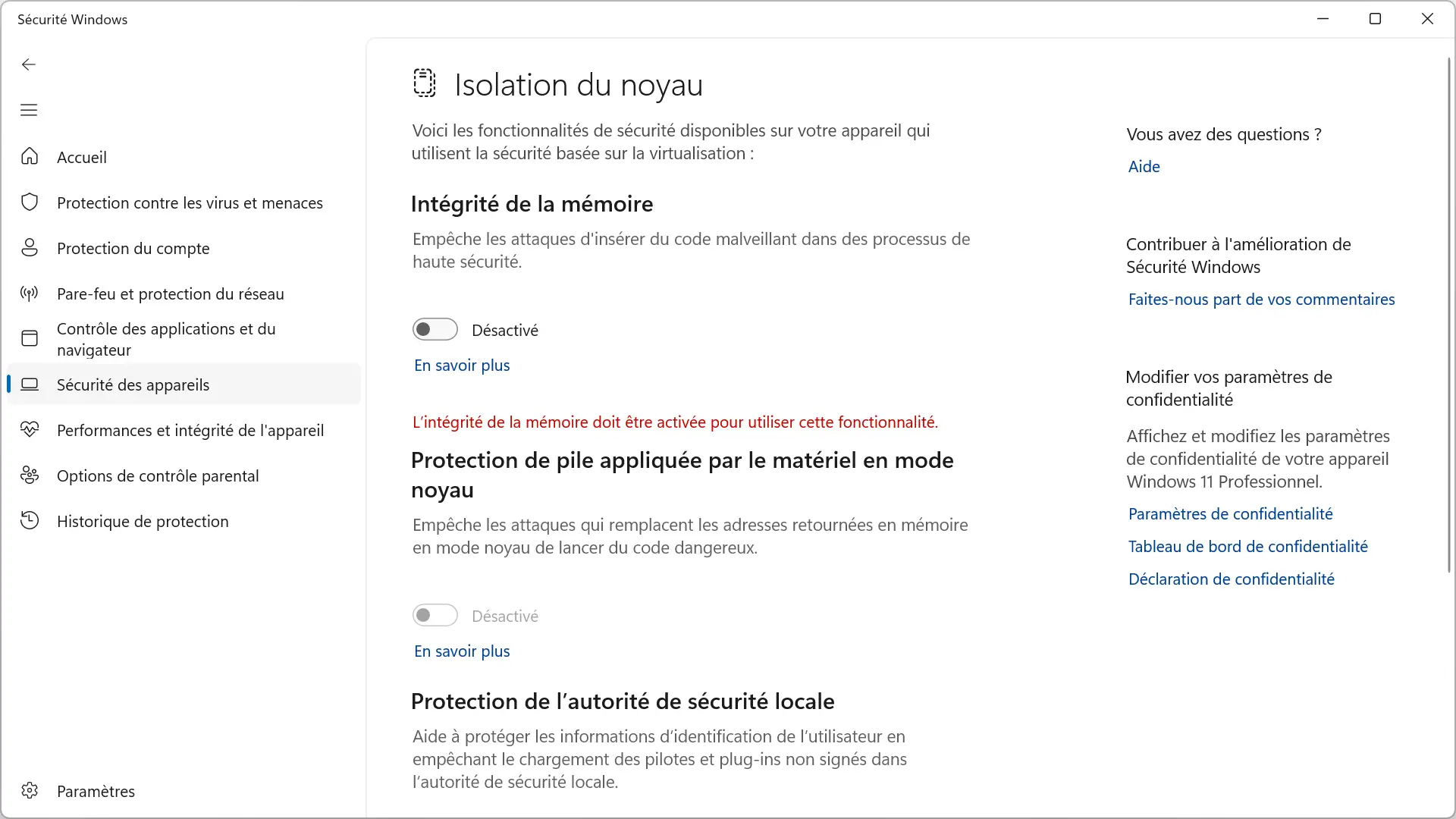
If the option is currently disabled, that doesn’t necessarily mean Microsoft will automatically enable it in October. As explained above, only PCs deemed eligible will be affected and Windows will also honor a deactivation voluntarily made by the user.