Microsoft has just released its November 2026 Patch Tuesday for Windows 11. Available from November 10, 2026, the KB5132061 update refers to system versions 24H2, 25H2, and 26H2, which move to builds 26100.9974, 26200.9974, and 26300.9974 respectively.
This new update fixes several bugs, including sound issues with certain USB audio devices, printing errors, and even Remote Desktop connection issues. It also brings several security fixes and includes new features from the optional update released at the end of October.
Here’s what you need to know about this new Windows 11 update and how to install it.
Windows 11 KB5132061: what’s new in this update?
With KB5132061, Microsoft incorporates the new features of the optional update KB5127936, released on October 28.
Among the most interesting changes we find the possibility of customizing the context menu, the arrival of dark mode in the “Folder Options” window or even reconstruction in the cloud, a function that allows you to reinstall Windows 11 from the Internet, even when the PC refuses to start.
Microsoft has also made some improvements here and there:
- File Explorer: Search results are more readable and now you can write.
~in the address bar to go directly to your user folder. - Settings: Permissions related to camera, microphone and location are grouped in the “Privacy and security” section.
- Autorun: The window that appears when you connect certain devices has been modernized and now supports dark mode.
- Start Menu and Taskbar: Microsoft has improved the display of Connected Mobile notifications and window preview animations.
- Accessibility: Magnifier lets you adjust the zoom separately on each screen, while Narrator can read mathematical equations in some apps.
If you want to know more about these changes, I invite you to consult my article dedicated to KB5127936, in which I detail all the news.
Please note that certain features are being rolled out gradually. Therefore, they may still not be available on your PC even after installing KB5132061.
Bugs fixed by KB5132061
Microsoft also fixed several bugs with this update. These are the main fixes:
- USB audio devices: Some devices using the USB Audio 1.0 standard may no longer work and display a “Code 10” error in Device Manager. This problem is now solved.
- AMD graphics cards: Sound may no longer work on certain displays or TVs connected via HDMI or DisplayPort. This solution refers in particular to Windows 11 24H2.
- Printers: Adding a published printer to Active Directory could result in error 87 (“The parameter is incorrect”).
- Remote Desktop: Some connections might fail due to a certificate issue.
November 2026 Patch Tuesday: 1,112 security vulnerabilities identified
The November 2026 Patch Tuesday lists no less than 1,112 vulnerabilities (CVEs) in various Microsoft products, including 729 for the Windows family.
Other products are also affected, notably Microsoft Office with 174 vulnerabilities, SQL Server (59), development tools (53), SharePoint Server (27) and even Microsoft Edge (22).
Please note that these figures refer to all products and versions listed. in the Microsoft newsletterand not just Windows 11. This does not mean that KB5132061 alone fixes 1,112 security vulnerabilities.
At the moment, the number of critical flaws and the number of vulnerabilities already exploited by hackers remain to be confirmed. I will complete this part as soon as this information is available.
KB5132061 is a security update that is installed automatically through Windows Update. If you want to check its availability now, here’s how to do it:
- open them Settings Windows 11 with shortcut windows + Yo.
- See you at Windows Updatethen click ” Check for updates “.
- If KB5132061 is available, click ” Download and install “.
- Once the installation is complete, restart your computer if Windows asks you to.
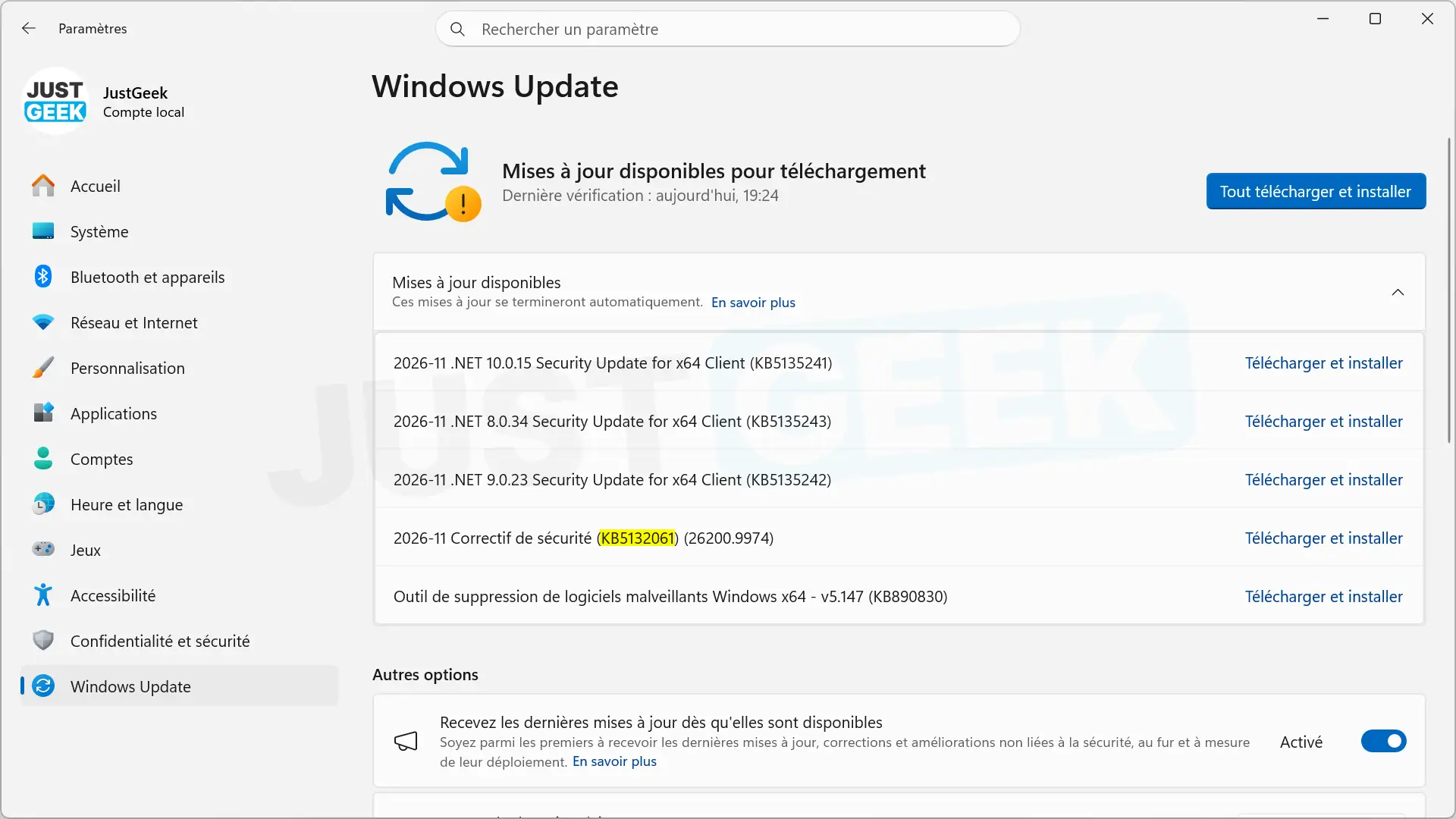
You can also manually download the update from the Microsoft Update catalog.
We remind you that Windows 11 24H2 no longer receives security updates in the Home and Professional editions since its support ended on October 13, 2026. Therefore, KB5132061 is reserved for the Business and Education editions for this version.
Fountain : microsoft