Windows 11 evolves every year with the arrival of a new version. But the old ones are not supported indefinitely. Each has its own end of support date, after which Microsoft stops providing monthly security updates.
The problem is that it’s not always easy to know where your version stands. Especially since the duration of support is not the same depending on the edition of Windows 11 installed on your PC.
To see it more clearly, we have grouped in this article all the end of support dates for Windows 11, as well as the procedure to follow to check the version installed on your PC.
Windows 11 Home and Pro: end of support dates
Let’s start with the Windows 11 editions found on most consumer PCs. Microsoft supports each version of Windows 11 Home and Pro for about two years.
During this period, the system continues to receive monthly security and quality updates through Windows Update. After the end of support date has passed, these updates are no longer provided for the affected version.
Here is the schedule published by Microsoft:
| Version | Availability date | End of support |
|---|---|---|
| Windows 11 26H2 | September 28, 2026 | October 9, 2028 |
| Windows 11 26H1 | February 9, 2026 | March 14, 2028 |
| Windows 11 25H2 | September 29, 2025 | October 12, 2027 |
| Windows 11 24H2 | September 30, 2024 | October 13, 2026 |
| Windows 11 23H2 | October 31, 2023 | November 11, 2025 |
| Windows 11 22H2 | September 19, 2022 | October 8, 2024 |
| Windows 11 21H2 | October 3, 2021 | October 10, 2023 |
These dates are for Home, Pro, Pro Education and Pro Workstation editions. Windows 11 SE also follows this schedule, but Microsoft stopped this edition with version 24H2. Therefore, you do not benefit from the following versions.
Windows 11 Business and Education: Longer Support
Enterprise and Education editions have a different support cycle. Microsoft supports each version for about three years, compared to two years for the Home and Pro editions.
Therefore, they generally continue to receive security updates for another year.
Here are the end of support dates announced by Microsoft:
| Version | Availability date | End of support |
|---|---|---|
| Windows 11 26H2 | September 28, 2026 | October 10, 2029 |
| Windows 11 26H1 | February 9, 2026 | March 13, 2029 |
| Windows 11 25H2 | September 29, 2025 | October 10, 2028 |
| Windows 11 24H2 | September 30, 2024 | October 12, 2027 |
| Windows 11 23H2 | October 31, 2023 | November 10, 2026 |
| Windows 11 22H2 | September 19, 2022 | October 14, 2025 |
| Windows 11 21H2 | October 3, 2021 | October 8, 2024 |
What about Windows 11 Enterprise LTSC?
Windows 11 also exists in LTSC (Long-Term Servicing Channel) editions, intended primarily for businesses and devices that need to stay on the same version for several years.
Its life cycle is much longer than that of classic versions of Windows 11. Therefore, Windows 11 Enterprise LTSC 2024, based on Windows 11 24H2, is supported for five years.
| Edition | Availability date | End of support |
|---|---|---|
| Windows 11 Enterprise LTSC 2024 | September 30, 2024 | October 9, 2029 |
| Windows 11 IoT Enterprise LTSC 2024 | September 30, 2024 | October 10, 2034 |
The difference is particularly significant for Windows 11 IoT Enterprise LTSC 2024. This edition benefits from ten years of support in total, that is, five years of standard support followed by five years of extended support.
Windows 11 26H1 is a bit of a special case
The presence of Windows 11 26H1 in these tables may be surprising. Unlike previous versions, Microsoft has not designed this update for PCs that are already equipped with Windows 11.
Windows 11 26H1 was developed to support a new generation of processors and only equips certain PCs released in 2026. Microsoft is therefore not offering to downgrade from Windows 11 24H2 or 25H2 to 26H1 via Windows Update.
If your PC is running Windows 11 25H2 and Windows Update does not offer you 26H1, there is nothing abnormal. This version simply has its own support cycle for the devices on which it comes preinstalled.
What happens when Windows 11 support ends?
When a version of Windows 11 reaches end of support, your PC doesn’t stop working overnight. You can still use it, start your software, and access your files as before.
However, Microsoft is no longer providing updates or security fixes for this version. If a new flaw is discovered, your PC may be exposed as no patch will be released to fix it.
Microsoft then recommends upgrading to a newer version of Windows 11 that is still supported. On consumer PCs that are not managed by an IT department, Windows Update can also automatically start updating when a version approaches or reaches the end of its support.
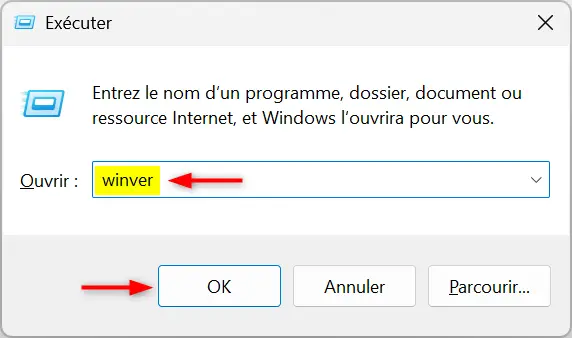
Don’t know which version of Windows 11 is installed on your PC? The easiest way is to use the command. winver.
- Press the keys windows + R to open the Run dialog box.
- Guy
winverthen press Entrance.
- An “About Windows” window opens. There you will find the version of Windows 11 installed on your PC, for example 24H2, 25H2 or 26H2.
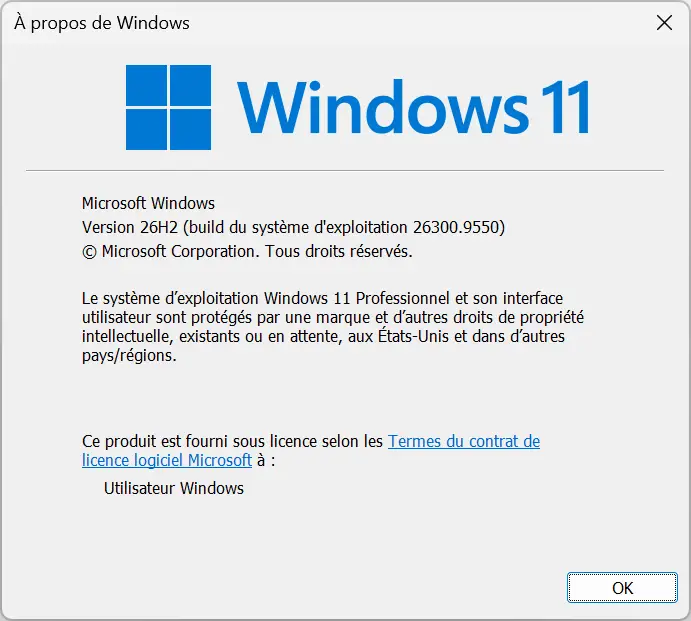
All you have to do is compare this information with the tables above to find out the end of support date for your version.