

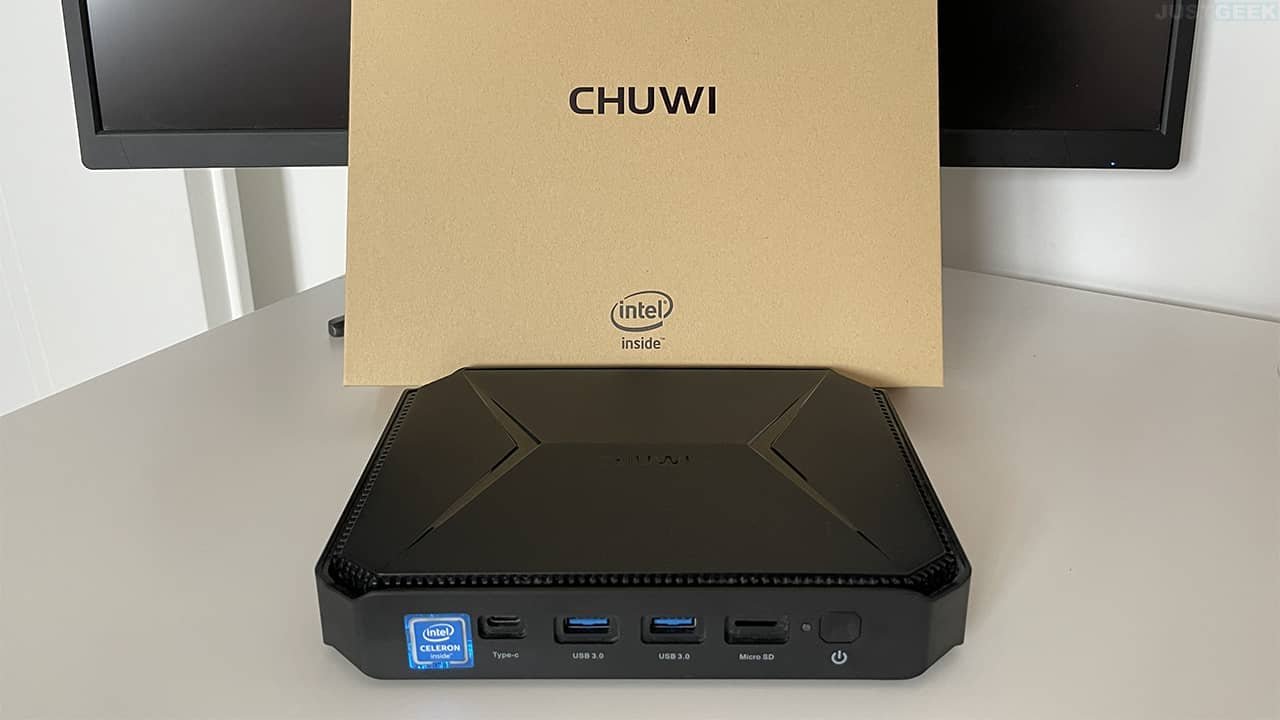
In 2020, CHUWI had presented the Herobox. This minicomputer It was then equipped with the Celeron Gemini Lake N4100. Today, the Chinese manufacturer returns to the forefront with a new model. Baptized Herobox ProThis mini PC this time has an Intel Celeron Jasper Lake N4500 processor. But then how much is this Chuwi Herobox Pro mini PC worth? What can we do with it? To know everything about the Herobox Pro mini PC, check out this article!
Notable changes
CHUWI has decided to make several changes to theHerobox Pro. To start, he swapped out the Celeron Gemini Lake N4100 CPU for a Jasper Lake N4500. This goes from a 1.1 to 2.4 GHz quad core recorded in 14 nanometers to a Dual core from 1.1 to 2.8 GHz engraved in 10 nanometers..
In terms of graphics, the Herobox Pro is quite similar to the Herobox. It actually comes with a Intel UHD GPU 600 Gen11 Graphics 16 EU compared to 12 UEs in the first generation.
This mini PC is compatible with Windows 10 and Linux. On the other hand, the Herobox Pro has 8GB LPDDR4 RAM as well as a 256 GB SSD in M2 format from Netac. Please note that you have a expandable memory thanks to a space available under the machine to accommodate a SATA drive in 2.5″ format.
We also learn that, unlike his predecessor, the Herobox Pro is equipped with a fan for better cooling. And finally, we note that this mini PC is average from the point of view of measurements. Its dimensions are 188 × 138 × 37 mm for a weight of 590 grams.
Product offers are temporarily unavailable.
What about connectivity?
In terms of connectivity, Herobox Pro has the same features as Herobox. Thus, we find the Wi-Fi 5 and the bluetooth 4.2 for wireless connection. It also consists of a port. Gigabit Ethernetof two USB 3.0 portstwo USB 2.0, a USB Type-C, a micro-SD port, a VGA connector and a HDMI 2.0 output. Everything is completed with a 3.5mm audio port for the sound.


A mini PC with varied uses
Like its predecessor, the Herobox Pro is designed for a variety of uses. For example, you can use it as office machine. It can also act as media server. Finally, Herobrox Pro will also work as a client for the cloud gaming. This mini PC is not designed to run games directly. In any case, the Herobox Pro is an interesting device with good value for money.
Packaging
I’m not going to dwell on the packaging of this mini PC because how can I tell you… Well, you get a cardboard box with the Herobox Pro mini PC inside, the charger, a mounting bracket (to fix the mini PC behind a PC or TV screen) as well as the famous user manual.

Product offers are temporarily unavailable.
CHUWI Herobox Pro Mini PC Review
Start-up
Let’s start at the beginning: the first beginning! When you start the Herobox Pro mini PC for the first time, you’ll be taken directly to the Windows 10 setup wizard. So, you’ll be asked to choose a username, a password, and finally answer countless privacy questions from Microsoft before you get to the Windows 10 Home (64-bit) desktop.
The good news is that you won’t need to purchase a product key to activate Windows 10. The mini PC comes with a valid license. Therefore, you can use it without a time limit. The only drawback is that it will not have the latest Windows 10 update, i.e. version 21H1. Therefore, you will need to go to Windows Update to download and install the latest updates. And if I can give you some advice, schedule a few hours of free time.
Indeed, when I installed the update to Windows 10 21H1 on the Herobox Pro mini PC, well, I had time to shower, have a coffee, eat my full meal (starter, main dish, cheese and dessert), mow the grass, the garden, and when I checked the progress it was at 98% 🙃 So I can tell you that it was long, very long…

Product offers are temporarily unavailable.
March
Well, otherwise, in terms of operation, it purrs well! The Herobox Pro mini PC works great 😎 I haven’t noticed any slowdowns while working in software like Office 2019 (Word, Excel, etc.) or Photoshop. Web browsing is also very smooth. Likewise for video playback with VLC it works very well. In short, the Herobox Pro mini PC works very well in office use.
Then, since I am a gamer in my free time, I wanted to try the mini PC in the game. So of course, since the Herobox Pro has no graphics card, I didn’t even bother trying to install a game. Instead, I signed up for a small subscription. Xbox cloud gaming.

I tested the mini PC in several games such as Forza Motorsport 7, Star Wars Jedi Fallen Order, Need for Speed Heat, Dirt 5, Batman Arkham City and Banjo-Kazooie. And again I was pleasantly surprised by the result, it works very well! Note that I have 1Gb/s fiber and played on a 24″ 120Hz MSI Optix display. I don’t know if that matters, but in any case, it’s clean.


There you have it, what else can I say… I also did a small test of the SSD with CrystalDiskMark and also a small benchmark with the application on the UserBenchmark site. I will provide you the screenshots below:


Product offers are temporarily unavailable.
Conclusion
for a PC for less than 200 eurosWell, in general I am satisfied. If you are looking for a mini PC to do office work and surf the Internet, the Herobox Pro could be perfect for you. Especially since you can very easily add a small hard drive or SSD to expand its storage.
On the other hand, if you were planning on playing with him, forget it! Unless, of course, you use a cloud gaming service like I did during my test, and in that case I say “ Yeah » !
Personally, the only drawback I find is its fan. I would have preferred a fanless case, but since I installed the mini PC in a small closet, the background noise of the fan doesn’t bother me as much.


